
Database Management Menu
Use File → Database to load a database, switch to a recent database, migrate, create, or back up a local database.
Assist Local Image Search Team2026-09-153 min read
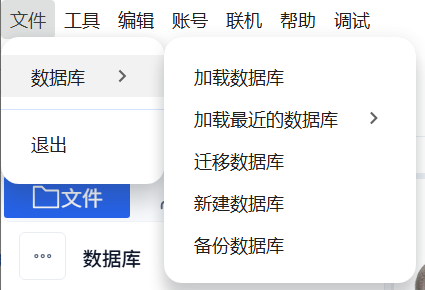
Use File → Database to load a database, switch to a recent database, migrate, create, or back up a local database.
The File → Database menu manages local database locations.
Open the Entry
Wait for the local service and database to become ready, then open File → Database.
Choosing an Operation
- Load Database: select an existing database directory containing
database.db. - Recent Databases: switch directly to a recent database that is still accessible and is not the current database.
- Migrate Database: copy the current database to a new location and switch to it.
- Create Database: create a new empty database in the selected location.
- Back Up Database: copy the current database without switching locations.
Notes
- On Windows, avoid Chinese characters in create, migrate, or backup destination paths.
- The destination must not already contain a
databasefolder. - Create, migrate and backup use a
databasesubfolder under the selected destination parent. Loading an existing database instead requires selecting the directory that directly containsdatabase.db. - Database backup or migration does not back up or move every original material file. After switching, check the database location and counts and open source files; visible cached thumbnails do not prove the originals remain accessible.
- Finish long refresh, repair, or export tasks before changing the database location.