
FAQOperation Guide
Keep a Windows Installer When Edge Says It Is Not Commonly Downloaded
If Edge warns that the Assist installer is not commonly downloaded, open the download item's menu and choose Keep.
Assist Local Image Search Team2026-10-062 min read
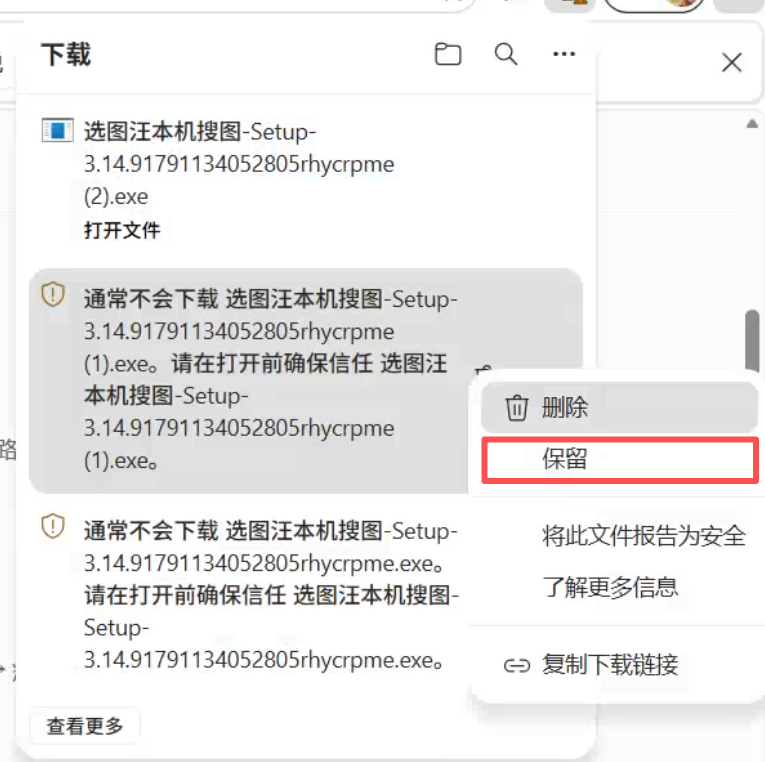
If Edge warns that the Assist installer is not commonly downloaded, open the download item's menu and choose Keep.
When Microsoft Edge says the Assist installer “isn't commonly downloaded,” confirm that you downloaded it from the official Assist website, then choose Keep to continue.
Steps
- Open Downloads at the top right of the browser and find the Assist installer.
- Open the download item's … menu and choose Keep (「保留」, highlighted in red in the screenshot).
- If Edge asks for another confirmation, choose Keep anyway. Once the download finishes, choose Open file to start installation.
These steps apply to the “isn't commonly downloaded” warning. Network failures and insufficient disk space need to be resolved according to the actual error.